Cloud computing has fundamentally transformed how businesses build, deploy, and scale applications. Instead of investing heavily in physical infrastructure, organizations now rely on cloud service providers to deliver computing resources over the internet.
At the core of cloud computing are three primary service models:
Infrastructure as a Service (IaaS)
Platform as a Service (PaaS)
Software as a Service (SaaS)
Understanding these models is essential for choosing the right cloud strategy, optimizing costs, and ensuring scalability.
In this guide, we’ll explore each model in depth, compare their differences, examine real-world use cases, and help you decide which one fits your needs.
Understanding Cloud Computing Service Models
Cloud computing service models define how much control, flexibility, and management responsibility a user has when using cloud resources.
Think of it like renting a place to live:
IaaS → You rent land and build everything yourself
PaaS → You rent a furnished apartment and focus on living
SaaS → You check into a hotel where everything is managed
Each model shifts responsibilities between the cloud provider and the user.
1. Infrastructure as a Service (IaaS)
What is IaaS?
Infrastructure as a Service (IaaS) is the most basic cloud service model. It provides virtualized computing resources over the internet, including:
Virtual machines (VMs)
Storage
Networking
Servers
With IaaS, you have maximum control over your infrastructure while the cloud provider manages the physical hardware.
Key Features of IaaS
On-demand resource provisioning
Pay-as-you-go pricing
High scalability
Full control over OS and applications
Flexible networking configurations
Examples of IaaS Providers
Amazon Web Services (AWS EC2)
Microsoft Azure Virtual Machines
Google Compute Engine
Advantages of Iaas
1. High Flexibility and Control: You can configure servers, install custom software, and manage operating systems.
2. Scalability: Easily scale resources up or down based on demand.
3. Cost Efficiency: No need to invest in physical hardware.
4. Disaster Recovery: Built-in backup and recovery solutions.
Disadvantages of IaaS
Requires technical expertise
Security responsibility lies with the user
Maintenance of OS and middleware
Use Cases of IaaS
Website hosting
Application testing environments
Big data analytics
Disaster recovery solutions
2. Platform as a Service (PaaS)
What is PaaS?
Platform as a Service (PaaS) provides a development and deployment environment in the cloud. It allows developers to build applications without worrying about infrastructure management.
The cloud provider handles:
Servers
Storage
Networking
Runtime environments
Middleware
Key Features of PaaS
Built-in development tools
Automated updates
Multi-language support
Integrated databases
Collaboration tools
Examples of PaaS Providers
Google App Engine
Microsoft Azure App Services
Heroku
Advantages of PaaS
1. Faster Development: Developers can focus on coding instead of infrastructure setup.
2. Reduced Complexity: No need to manage servers or operating systems.
3. Cost Savings: Lower operational overhead.
4. Built-in Scalability: Applications automatically scale based on demand.
Disadvantages of PaaS
Limited control over infrastructure
Vendor lock-in risk
Less flexibility for custom configurations
Use Cases of PaaS
Web and mobile app development
API development
Agile development workflows
Microservices architecture
3. Software as a Service (SaaS)
What is SaaS?
Software as a Service (SaaS) delivers fully functional applications over the internet. Users can access software through a web browser without installing or maintaining it.
The cloud provider manages everything, including:
Infrastructure
Platform
Application
Updates
Security
Key Features of SaaS
Web-based access
Subscription-based pricing
Automatic updates
Multi-device compatibility
No installation required
Examples of SaaS Applications
Google Workspace
Microsoft 365
Salesforce
Dropbox
Advantages of SaaS
1. Ease of Use: No setup or installation required.
2. Accessibility: Access from anywhere with an internet connection.
3. Cost Effective: No upfront costs only subscription fees.
4. Automatic Updates: Always use the latest version.
Disadvantages of SaaS
Limited customization
Data security concerns
Dependence on internet connectivity
Use Cases of SaaS
Email services
Customer relationship management (CRM)
Project management tools
Collaboration platforms
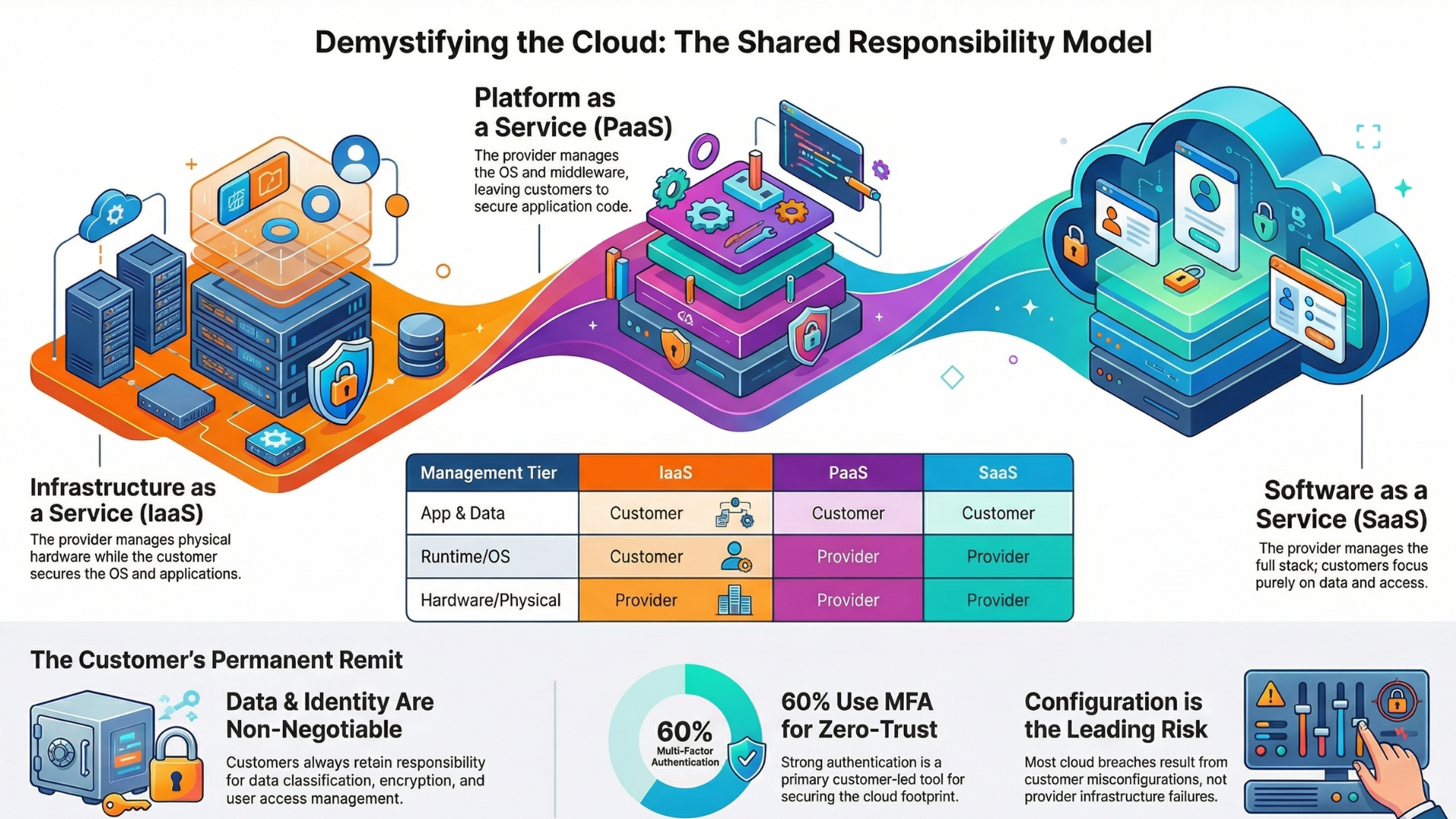
Shared Responsibility Model
Each cloud service model follows a shared responsibility model, where responsibilities are divided between provider and user.
IaaS Responsibility
Provider: Hardware, networking
User: OS, applications, data
PaaS Responsibility
Provider: Infrastructure + platform
User: Applications and data
SaaS Responsibility
Provider: Everything
User: Usage and data input
How to Choose the Right Cloud Service Model
Choosing the right model depends on your business goals, technical expertise, and scalability needs.
Choose IaaS if:
You need full control over infrastructure
You have a skilled IT team
You require custom configurations
Choose PaaS if:
You want faster development cycles
You want to reduce infrastructure management
You are building scalable applications
Choose SaaS if:
You want ready-to-use software
You don’t want maintenance responsibilities
You prioritize ease of use
Real-World Example
Imagine building an eCommerce platform:
IaaS → You build everything from scratch (servers, backend, frontend)
PaaS → You focus on development while platform handles deployment
SaaS → You use platforms like Shopify to run your store
Benefits of Cloud Computing Across All Models
Cloud computing whether IaaS, PaaS, or SaaS offers a consistent set of advantages that help businesses become more agile, efficient, and scalable. Here are the key benefits across all cloud service models:
1. Cost Efficiency
One of the biggest advantages of cloud computing is reduced IT costs. Instead of investing in expensive hardware and infrastructure, businesses pay only for what they use.
No upfront capital expenditure
Pay-as-you-go pricing models
Reduced maintenance and upgrade costs
This makes cloud computing especially beneficial for startups and growing businesses.
2. Scalability and Flexibility
Cloud services allow businesses to scale resources up or down instantly based on demand.
Handle traffic spikes without downtime
Scale storage and computing power easily
Adapt quickly to changing business needs
This flexibility ensures optimal performance without over-provisioning resources.
3. Accessibility and Remote Access
Cloud computing enables users to access applications and data from anywhere with an internet connection.
Supports remote and hybrid work environments
Access across devices (laptops, tablets, smartphones)
Real-time collaboration among teams
This has become essential for modern distributed teams.
4. Faster Deployment and Time-to-Market
With cloud platforms, businesses can deploy applications quickly without waiting for infrastructure setup.
Rapid provisioning of resources
Faster development and testing cycles
Reduced delays in product launches
This helps organizations stay competitive in fast-moving markets.
5. High Availability and Reliability
Cloud providers offer robust infrastructure with minimal downtime.
Built-in redundancy and failover systems
Data backup and disaster recovery options
Service-level agreements (SLAs) ensuring uptime
This ensures business continuity even during unexpected failures.
Common Challenges
Despite its advantages, cloud computing has challenges:
Data privacy concerns
Vendor lock-in
Downtime risks
Compliance issues
Expert Cloud Engineering Services for Scalable Growth | Advant AI Labs
Accelerate your cloud journey with Advant AI Labs’ expert cloud engineering services.
From scalable architecture to seamless migration and optimization, we build secure, high-performance solutions tailored to your business.
Unlock agility, reduce costs, and innovate faster with a trusted partner. Get started with Advant AI Labs today and transform your cloud infrastructure. Contact Now
Read More: How to Find a Reliable Cloud Migration Partner
Frequently Asked Questions
1. What are the three main cloud computing service models?
Answer: The three main models are:
Infrastructure as a Service (IaaS)
Platform as a Service (PaaS)
Software as a Service (SaaS)
2. Which cloud service model is best?
Answer: It depends on your needs:
IaaS → for control
PaaS → for development
SaaS → for ease of use
3. Is SaaS part of PaaS?
Answer: No, SaaS and PaaS are separate cloud service models with different levels of control and responsibility.
4. What is an example of SaaS?
Answer: Examples include Google Workspace, Salesforce, and Microsoft 365.
5. Can businesses use all three models?
Answer: Yes, many organizations adopt a hybrid approach, using IaaS, PaaS, and SaaS together.
Conclusion
The three main cloud computing service models IaaS, PaaS, and SaaS form the foundation of modern digital infrastructure.
Each model serves a different purpose:
IaaS offers maximum control and flexibility
PaaS simplifies development and deployment
SaaS delivers ready-to-use applications
Understanding their differences helps businesses make informed decisions, optimize costs, and build scalable systems. As cloud technology continues to evolve, selecting the right service model will remain a critical factor in achieving digital success.