Local businesses today are no longer competing only with nearby shops they’re competing with digital-first brands, online marketplaces, and customer expectations shaped by technology.
Whether you run a retail store, clinic, logistics company, or service-based business, adopting the right IT solutions can dramatically improve efficiency, customer experience, and profitability.
This guide breaks down the Best IT solutions for local businesses, how they work, and how to choose the right ones for your needs.
What Are the Best IT Solutions for Local Businesses?
Technology is no longer optional it’s the backbone of modern business operations.
Here’s what the right IT solutions can help you achieve:
Streamline daily operations
Improve customer engagement
Increase revenue through automation
Enhance data security
Enable smarter decision-making
Compete with larger enterprises
Without the right systems in place, businesses risk inefficiencies, lost opportunities, and poor customer experiences.
1. Cloud Computing Solutions
What It Is
Cloud computing allows businesses to store data, run applications, and manage operations online instead of relying on physical servers.
Why It’s Important
Access data from anywhere
Reduce hardware costs
Improve collaboration
Scale easily as your business grows
Key Use Cases
File storage and sharing
Remote team collaboration
Backup and disaster recovery
Popular Tools
Google Workspace
Microsoft 365
Dropbox Business
Best For
All local businesses, especially those with remote teams or multiple locations.
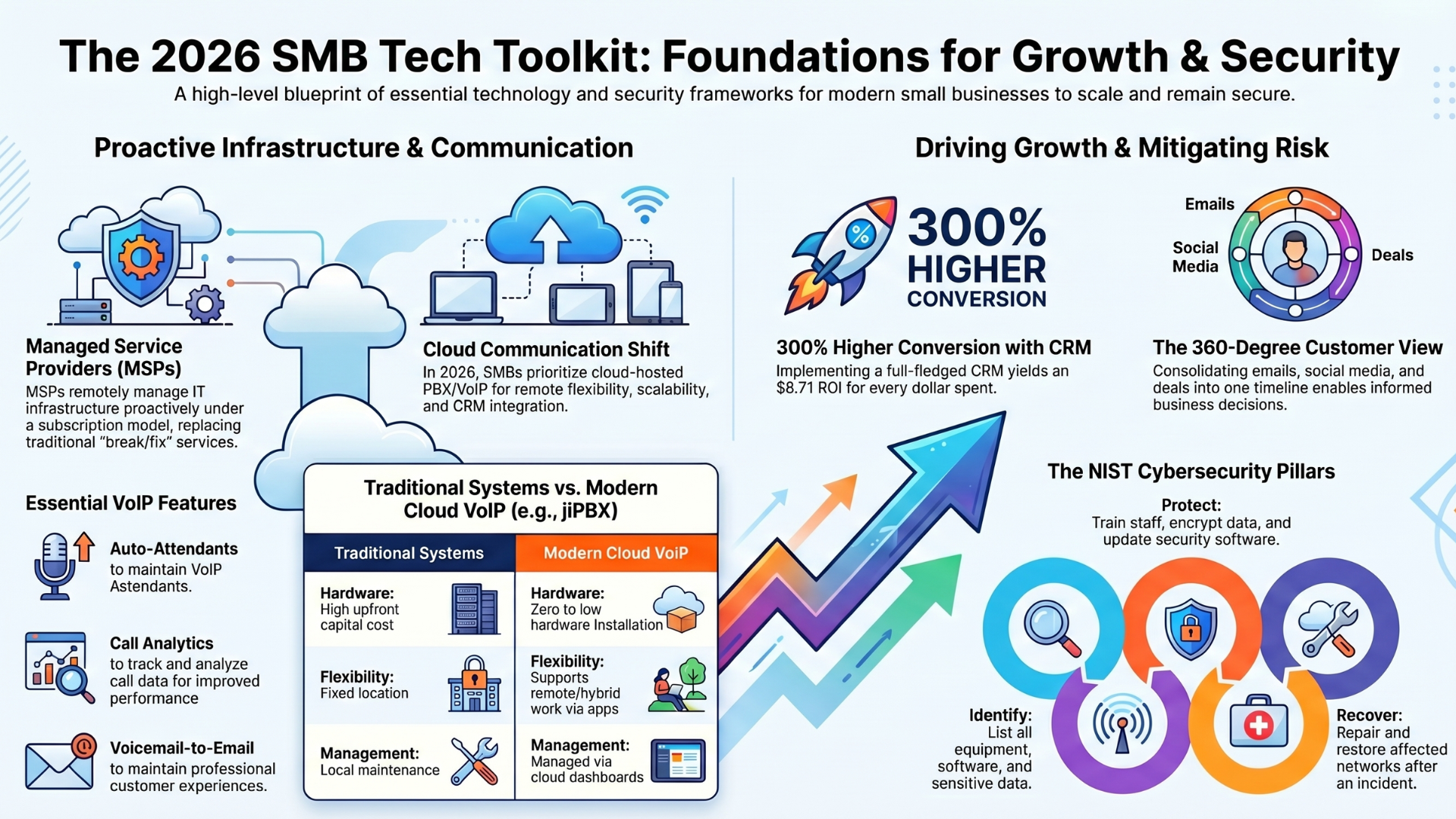
2. Customer Relationship Management (CRM) Systems
What It Is
CRM software helps manage customer data, track interactions, and improve relationships.
Why It’s Important
Centralizes customer information
Improves sales tracking
Enhances customer service
Automates follow-ups
Key Features
Contact management
Sales pipeline tracking
Email automation
Customer support integration
Popular Tools
HubSpot CRM
Zoho CRM
Salesforce
Best For
Retail stores, service providers, consultants, and any business dealing with customers regularly.
3. Point of Sale (POS) Systems
What It Is
A POS system handles sales transactions, inventory tracking, and billing.
Why It’s Important
Speeds up checkout process
Tracks sales in real-time
Manages inventory efficiently
Provides valuable sales insights
Key Features
Barcode scanning
Payment processing
Inventory management
Sales reporting
Popular Tools
Square POS
Shopify POS
Lightspeed
Best For
Retail shops, restaurants, and cafes.
4. Accounting and Financial Management Software
What It Is
Software that helps manage finances, invoices, taxes, and expenses.
Why It’s Important
Reduces manual errors
Automates bookkeeping
Simplifies tax filing
Provides financial insights
Key Features
Invoice generation
Expense tracking
Tax calculation
Financial reporting
Popular Tools
QuickBooks
Tally
Xero
Best For
Every local business, regardless of size.
5. Website and E-Commerce Solutions
What It Is
Platforms that allow businesses to create websites and sell products or services online.
Why It’s Important
Establishes online presence
Expands customer reach
Enables 24/7 sales
Builds brand credibility
Key Features
Website builder
Payment integration
Product catalog
SEO tools
Popular Tools
WordPress
Shopify
Wix
Best For
Retailers, service providers, and businesses looking to grow online.
6. Digital Marketing Tools
What It Is
Tools that help promote your business online through SEO, social media, and ads.
Why It’s Important
Attracts new customers
Improves visibility
Builds brand awareness
Drives sales
Key Areas
Search Engine Optimization (SEO)
Social media marketing
Email marketing
Paid advertising
Popular Tools
Google Ads
Meta Ads Manager
Mailchimp
Best For
Businesses looking to grow their customer base.
7. Cybersecurity Solutions
What It Is
Technologies that protect your business from cyber threats, data breaches, and hacking.
Why It’s Important
Protects sensitive data
Builds customer trust
Prevents financial losses
Ensures compliance
Key Features
Antivirus software
Firewalls
Data encryption
Multi-factor authentication
Best Practices
Regular software updates
Employee training
Secure backups
Best For
All businesses, especially those handling customer data.
8. IT Support and Managed Services
What It Is
Outsourced IT services that manage your technology infrastructure.
Why It’s Important
Reduces downtime
Provides expert support
Saves hiring costs
Ensures smooth operations
Services Included
Network management
System monitoring
Troubleshooting
Software updates
Best For
Businesses without an in-house IT team.
9. Inventory Management Systems
What It Is
Software that tracks stock levels, orders, and supply chains.
Why It’s Important
Prevents stockouts
Reduces overstocking
Improves efficiency
Provides real-time data
Key Features
Stock tracking
Order management
Supplier integration
Reporting
Popular Tools
Zoho Inventory
TradeGecko (QuickBooks Commerce)
Best For
Retailers, wholesalers, and manufacturing businesses.
10. Communication and Collaboration Tools
What It Is
Tools that help teams communicate and work together efficiently.
Why It’s Important
Improves productivity
Enables remote work
Reduces miscommunication
Speeds up decision-making
Key Features
Messaging
Video conferencing
File sharing
Task collaboration
Popular Tools
Slack
Microsoft Teams
Zoom
Best For
Businesses with teams or multiple employees.
11. Automation and AI Solutions
What It Is
Technologies that automate repetitive tasks and provide intelligent insights.
Why It’s Important
Saves time
Reduces human error
Improves efficiency
Enhances customer experience
Use Cases
Chatbots for customer support
Automated email campaigns
Predictive analytics
Workflow automation
Best For
Growing businesses looking to scale operations.
12. Data Analytics and Business Intelligence Tools
What It Is
Tools that analyze data to provide actionable insights.
Why It’s Important
Helps make informed decisions
Identifies trends
Improves performance
Enhances strategy
Key Features
Dashboards
Reporting
Data visualization
Forecasting
Popular Tools
Google Analytics
Power BI
Tableau
Best For
Businesses focused on growth and optimization.
13. Backup and Disaster Recovery Solutions
What It Is
Systems that protect your data and ensure recovery in case of loss.
Why It’s Important
Prevents data loss
Ensures business continuity
Protects against cyberattacks
Minimizes downtime
Key Features
Automated backups
Cloud storage
Fast recovery options
Best For
All businesses, especially those relying on digital data.
How to Choose the Right IT Solutions
Choosing the right IT solutions depends on your business size, industry, and goals.
1. Identify Your Needs
Start by clearly understanding your business challenges and pain points. This will help you choose solutions that actually deliver value. Ask yourself:
Are you losing customers or struggling with retention?
Are your daily operations slow or unorganized?
Are inefficiencies affecting productivity or revenue?
A clear assessment ensures you invest in the right tools from the beginning.
2. Set a Budget
IT solutions vary widely in cost, from affordable subscriptions to more advanced enterprise systems. Define a realistic budget and prioritize tools that offer the best return on investment. Opt for scalable solutions so you can upgrade as your business grows.
3. Focus on Integration
Choose tools that integrate easily with each other. A well-connected system improves workflow, reduces manual work, and ensures data flows seamlessly across your business operations.
4. Prioritize Security
Security should never be an afterthought. Select solutions with strong security features such as data encryption, secure access controls, and regular updates to protect your business and customer information.
5. Choose Scalable Solutions
Your business will grow, and your technology should grow with it. Invest in solutions that can adapt to increasing demands, additional users, and expanding operations without requiring a complete overhaul.
Common Mistakes to Avoid
Choosing too many tools at once
Ignoring employee training
Overlooking cybersecurity
Not planning for scalability
Focusing only on cost instead of value
FAQs
1. What is the most important IT solution for a local business?
Answer: Cloud computing and CRM systems are often the most essential as they improve accessibility and customer management.
2. Are IT solutions expensive for small businesses?
Answer: Not necessarily. Many tools offer affordable plans and scalable pricing.
3. Can IT solutions help increase sales?
Answer: Yes, through better customer engagement, automation, and data-driven insights.
4. How do I start implementing IT solutions?
Answer: Begin with your biggest pain point like customer management or accounting and expand gradually.
5. Do small businesses need cybersecurity?
Answer: Absolutely, Even small businesses are targets for cyberattacks, making security essential.
Read More: How to Hire a Reliable Custom Software Development Company
Final Thoughts
The best IT solutions for local businesses are not about adopting the latest technology—they’re about choosing the right tools that solve real problems.
A smart combination of:
Cloud computing
CRM systems
POS solutions
Cybersecurity
Automation tools
Can transform how your business operates and grows. Start small, focus on your core needs, and scale as your business evolves. The right IT foundation will not only improve efficiency but also give you a competitive edge in an increasingly digital world.